The Road Ahead For Battlefield 1: Expansions And Celebrations
1
Connecting and playing with your friends has always been a central aspect of the Battlefield multiplayer experience. To help make this easier, we are now releasing Squad Join Beta for Battlefield 4. This is something we know our fans have been asking for – and something we wish we could have provided at launch – so we are now happy to present the first iteration of Squad Join.
Squad Up Before Battle
Squad Join Beta allows you to set up a squad for up to 5 people before joining a multiplayer server. This means that you and 4 of your friends can join a Battlefield 4 match as a squad, and deploy directly in the game together. Once in-game, you and your squad mates are guaranteed to stick together over rounds.
We would like to add that Squad Join Beta is the first iteration of the feature. We will continue to add features and tweaks based on your feedback and comments, and are aiming to release the next version of Squad Join when Battlefield 4 Dragon’s Teeth arrives this summer. Also note that Squad Join Beta is available for PS3, PS4, Xbox 360, and Xbox One.
Before digging into the details, check out this Squad Join Beta tutorial video (note that this clip shows a work in progress).
How It’s Done
To join Battlefield 4 as part of a squad, simply choose “Squad Join Beta” in the game’s multiplayer menu. Here you will be able to see a list of active squads, or create your own. A list of the five slots will appear, with the squad leader indicated by a star. When you’re good to go, just initiate quickmatch to join a game, and you’ll be in-game with your squad mates, ready to bring your team to victory.
Also, if you’ve left your squad and want to re-join it, you can do so – if the squad has a free slot. Joining this way will enable you to both join the squad and the match at the same time.
Other Squad Join Features
As mentioned, this is the first iteration of Squad Join and other features for it are planned, with the first major update coming within the next months (a more exact date will be communicated later). In this multi-release process, we are working on features like managing party members, and making Squad Join available for all game modes.
Initially, Squad Join Beta will be available in the Battlefield 4 base game maps in the Conquest, Team Deathmatch, Obliteration, Rush, and Domination game modes. All the other Battlefield 4 maps and more game modes will be supported in later iterations of Squad Join.
Give us Your Feedback
Your comments and feedback are valuable to us. We’d really like to hear your input about Squad Join Beta and make you a part of improving this feature. Please leave your comments below. We hope you will enjoy trying out Squad Join Beta, and that it will make your time in Battlefield 4 even more enjoyable.
After we asked you to submit your best Battlefield 4 moments to the second round of our Top Play competition, you did not let us down. Tons of incredible clips from your deeds on the Battlefield have been sent in. For that we thank you.
We’ve narrowed down all new Top Play submissions to four great moments. Now it’s up to you to vote for the best one.
Vote for your selection – A, B, C, or D – below in the comments, on the Battlefield Facebook, or Twitter.
A. The Broken Machine – Opening a Round Like a Boss
B. MitchDoss – With a Flick of the Wrist
C. AZPacmane – C4 Above the Seashore
D. sn3gaming – 1619m longest headshot
UPDATE 5/2: Players who rented servers on Xbox One and PlayStation 4 should now once again have full access to in-game administration tools to manage their server. Unfortunately, due to high demand, we are still experiencing issues where some 64 player rented servers can fail to start. While we investigate, we recommend that server administrators who are experiencing this issue set their servers to 50 players or less. We would like to thank those early adopters of the Rent-a-Server Program for Battlefield 4 for their patience during the last few days as we worked on solving the ongoing issues. We plan to add additional days to all Xbox One and PlayStation 4 rented servers free of charge. These free days will be added as soon as possible – please check back here for updates.
For those players looking to rent their own server, unfortunately all servers available at launch were quickly snapped up, but we will be adding more servers for rent as soon as possible. Thank you for your patience.
UPDATE 4/30: Due to a high demand for the Rent-a-Server Program on PlayStation 4, we’ve noticed an issue with 64-player servers and removed the RSP option on this platform until players can properly access what they’ve paid for. We apologize for any inconvenience and appreciate your patience as we continue to improve the RSP program.
UPDATE 4/29: We have identified rental time issues with the Rent-a-Server Program release on Xbox One and have temporarily removed the feature as we investigate. The servers which were already rented will still be available for play, but admins may not be able to access all the management features at this time. As soon as a fix is in place we will announce its availability. If you rented any servers on Xbox One and are experiencing issues please contact EA Customer Support at http://help.ea.com.
Please stay tuned to the blog for updates. We apologize for any inconvenience this may cause and appreciate your patience.
Today, the Rent-A-Server program has started to roll out for console versions of Battlefield 4. This will let you set up your own private and public Battlefield 4 servers, with control of different options from player count to map rotation. Thanks to these customization options, you’ll be able to create games that suit the play style for you and your friends.
We’d also like to inform you that with today’s server update, we are deploying a fix for the issue being referred to as “Death Shield,” where an invisible “shield” would appear around killed enemies, blocking weapons fire. Thank you for being patient as we worked to get this resolved.
How to Rent a Server
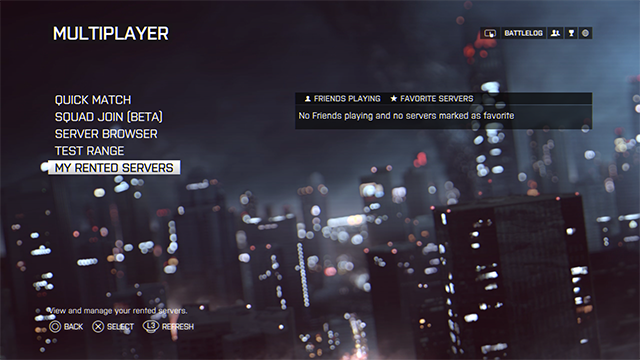
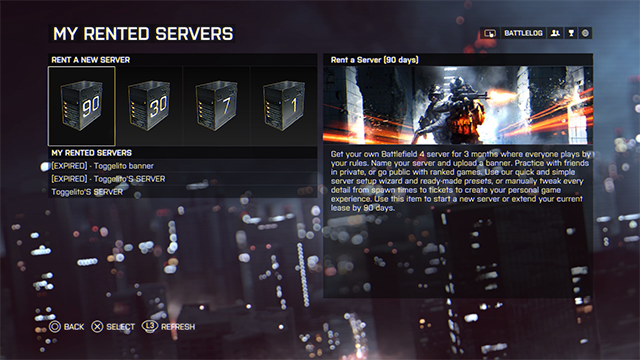
Start up Battlefield 4, go to the Multiplayer menu and select “My Rented Servers”. Here you’ll be able to rent a new server and manage the ones you’ve already rented. After choosing server location and duration of the rental, the purchase is complete. You can find your server under MULTIPLAYER / MY SERVERS. After this, server settings like game modes, map rotation, and much more can be altered.
Rental Periods and Prices
You can rent a Battlefield 4 server on console for a number of different days. The price for renting a server is as follows:
1 day ($1.49)
7 days ($6.99)
30 days ($24.99)
90 days ($59.99)
Server Amount Will Increase
Please note that this is a soft launch of the Rent-A-Server program. This means that we initially will have a limited amount of servers. We will however increase the numbers gradually when we see that everything is running as intended.
We hope you will enjoy the Rent-A-Server program. Don’t hesitate to give us your feedback and comments. Thanks for your support, and see you on the Battlefield!
A couple weeks ago we asked you to submit your best Battlefield 4 Top Play video. Many entries were received, only one winner claimed all of the glory – Blitzeh’s Quad + C4 + Heli = Fireworks.
We are excited to bring you Round 2 of the BF4 Top Play Competition series. Submit your best Battlefield moment video by Thursday, May 1st where we will select the top four entries and allow the rest of the community to vote. The winner will be announced on Friday Saturday.
Submit your video by tagging #BF4TopPlay on the Battlefield Facebook and/or Twitter.
Good luck!
Hi everyone,
As you know, we’ve been looking into resolving the “rubber banding” that some players on certain platforms have experienced with Battlefield 4 after the recent release of Naval Strike. We’ve found that the root cause of the issue was a configuration of certain hardware types dedicated to 64-player matches.
We have invested in new hardware to resolve this issue and deployed new higher-performance servers this week. In preparation, we conducted a significant amount of testing before installing the new servers to ensure they would correct the issue. We are already seeing performance improvement with 64-player matches and expect this to continue.
While the process took longer than we would’ve liked, we wanted to be 100% sure it was done right and that the long-term solution was properly in place.
Our objective is to deliver the best player experience possible. We feel this solution helps us deliver that to you. Stay tuned to our official channels for more information.
Thanks,
Karl Magnus Troedsson, DICE VP & GM